Overview · the portal tour

The synthesis, the leads, the index — on one screen.

Track delivers the downgrade lead list and the monthly briefing to your inbox. Overview opens the portal: read the monthly synthesis interactively, sort and filter the lead list, search the full 31,000-home index, and export to CSV. Built for the consultant who references it in client work.

£149 / month · first 30 days free · cancel any time.

01

The monthly synthesis.

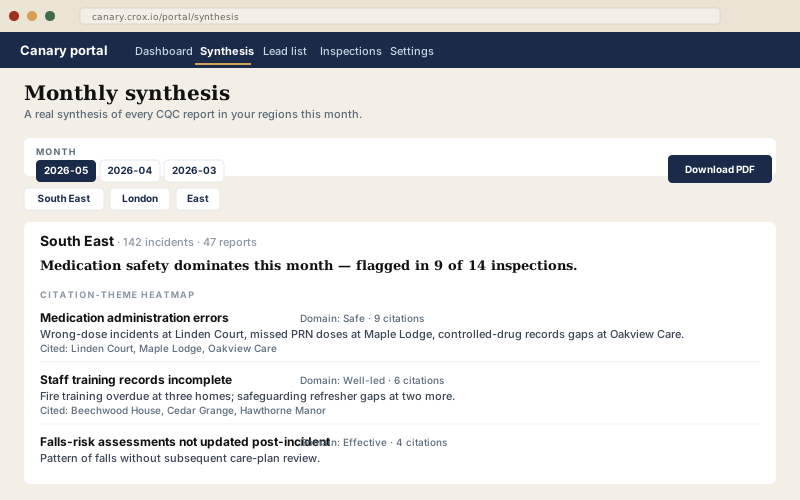
A real synthesis of every CQC report published in your regions that month — not a list, a synthesis. Citation-theme heatmap, compliance-gap signal, enforcement summary, provider-size cohort. Reference it in client work. Download the PDF.

  • Five regions covered every month (all 9 on Overview-Pro)
  • AI-extracted themes grounded in real inspector citations
  • Provider names link straight to their public CQC profile
  • Twelve-month archive in the sidebar
  • "Download as PDF" if you want the artefact
Canary portal synthesis view
02

The downgrade lead list.

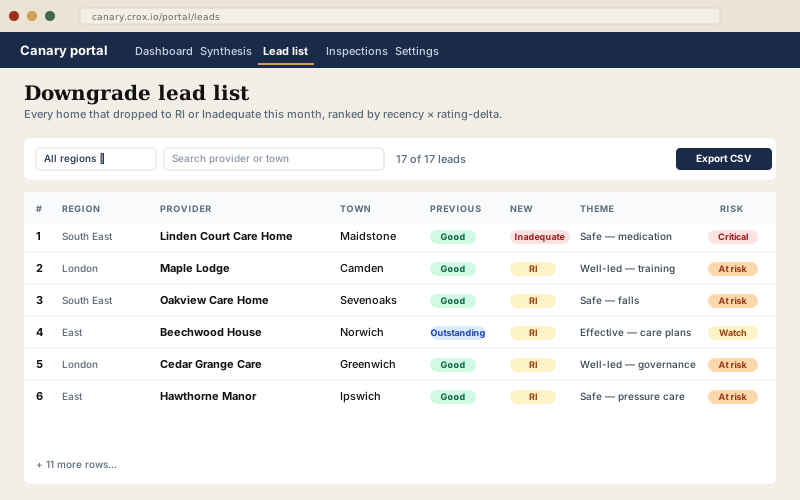
Every home that just dropped to Requires Improvement or Inadequate in your regions, ranked by recency × rating-delta. Each row carries the citation theme, the one-line sales hook, and a click-through to the public profile page. Export to CSV for your CRM.

  • Updated every 1st of the month, in time for the cold-call window
  • Filter by region or search by provider/town
  • Click any row through to the unauthenticated public profile
  • CSV export with the canonical seven fields
  • Pro adds the risk-score column for the quarterly review
Canary portal lead list
03

The dashboard.

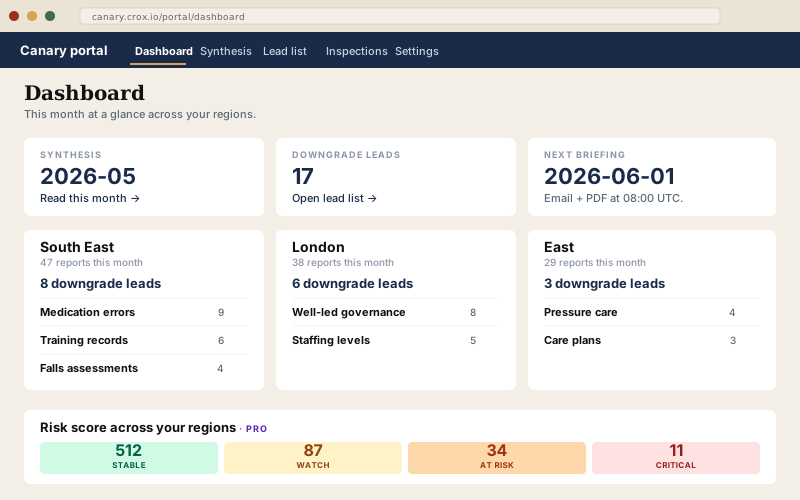
This-month-at-a-glance for every region you cover — downgrade count, top three citation themes, next briefing date, and (on Pro) the risk-score distribution across your firm's regions. The single page you open at 09:00 on the 1st.

  • Per-region cards with lead count + top three themes
  • One-click into the synthesis, lead list, or settings
  • Next-briefing countdown
  • Pro: risk-score band distribution (Stable / Watch / At risk / Critical)
Canary portal dashboard

The artefact your clients will ask where you got it.

If you're billing for compliance work and your clients ask "what's the regulator focused on this quarter," Overview pays for itself the first time you reference it on a call. £149/month. Cancel any time. First 30 days free.

Frequently asked

What you'll probably want to know.

What's the difference between Track and Overview?

Track is email + PDF, no portal. You get the downgrade lead list and the monthly briefing in your inbox on the 1st — everything to act on without logging in anywhere. Overview adds the portal: the monthly synthesis rendered interactively, the lead list as a sortable table you can export, and the full 31k-home index search. Same lead list, deeper artefact. If your clients ever ask "can you send me the underlying report?", Overview is the upgrade.

How does sign-in work?

Magic-link, no password. You enter your email at /login, we send a one-time sign-in link, you click it, you're in. Sessions last 30 days. Every monthly briefing email carries a magic link too — click any one and land authenticated.

Can I try it before paying?

Yes — first 30 days free on Overview (and on Track). You can cancel at any point in the trial and pay nothing.

How fresh is the data?

The full CQC location + report dataset is refreshed daily. New inspection reports surface in the portal within hours of CQC publishing them. The monthly synthesis runs at 06:30 UTC on the 1st; the lead list at 07:30; briefings ship at 08:00. See data sources for the full provenance.

I have a team of consultants — can we all share one account?

Yes, that's what Overview-Pro is for. Each consultant gets their own portal login (magic-link, one per seat) but shares the firm's region config and saved searches. Pro is talk-to-us: drop Adam a line.